
Community Servers
Create or join servers organized with channels for different topics, announcements, and discussions.
Discord is a powerful communication platform that allows you to connect with friends, communities, and teams through voice, video, and text. Explore features, app details, and download options below.

Discord provides communication tools for communities, teams, and friends to connect through text, voice, and video.
Create or join servers organized with channels for different topics, announcements, and discussions.
Participate in real-time voice and video conversations with individuals or groups.
Send private messages, media files, and links securely to friends and contacts.
Manage communities using built-in moderation tools, roles, and customizable permissions.
Share your screen during calls for collaboration, study sessions, or presentations.
Access Discord on Android, iOS, desktop, or web with synchronized messages across devices.
Below are sample previews of the Discord Android interface, including chat layout, voice channels, and server organization.
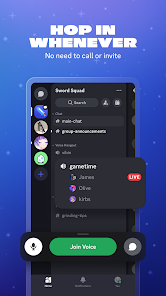


Follow the steps below to install the official Discord app on your Android device.
Tap the Download from Official Website or Get it on Google Play button above.
If redirected to Google Play, tap Install and wait for the app to download automatically.
Once installation is complete, open the app, sign in or create an account, and start joining servers.
Yes. Discord is free to use, with optional premium features depending on region and plans.
Safest option is always official sources (Discord website / Google Play). Avoid unknown sites.
Yes, Discord supports Windows, macOS, Linux, and web.
In many cases yes, but Discord may request verification depending on security checks.
Use official links for the safest experience.